
Model Calculator
The Model Calculator is an interactive tool for exploring your agency's core business model based on your inputs. The Agency Model chooser loads any People grid you have access to into the calculator.
Assistants can read the same scenarios through the MCP tool get_model_scenario; see scenarios.
The scenario bar
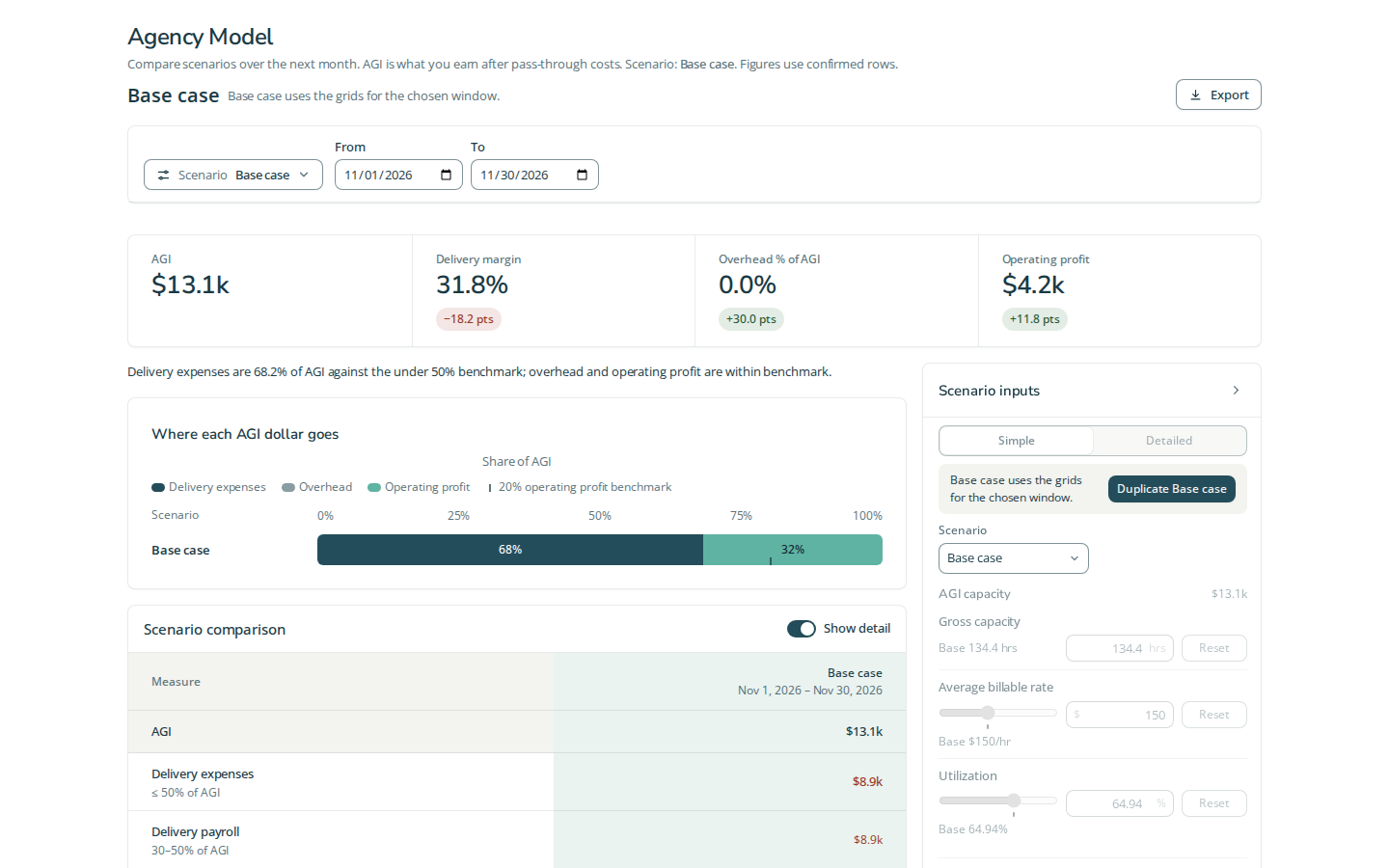
The Scenario selector and the From / To date range sit side by side in the bar at the top of the page. From and To set the Base case window. Any valid range is accepted, including past dates, multiple months and a single day. Figures recalculate as soon as both dates form a valid range; no Refetch click is needed. The initial window remains next month. A reversed or incomplete range stays visible for correction while the figures retain their last valid window.
The Scenario comparison table opens with "Show detail" on. You can turn it off.
Agency gross income (AGI) is income after pass-through costs. Average billable rate (ABR) is currency per delivery hour; utilization relates delivery hours to gross capacity.
Three primary tasks
- Load the baseline. Open the Model Calculator from the account or its chooser, selecting the People and Expenses inputs you can access. Base case takes its inputs from the grids for your chosen window. Check From and To in the scenario bar; the initial period is next month.
- Try an alternative. Duplicate Base case from the Scenario control, name the copy and edit its assumptions. Enter confirms an input and leaving it applies the value. The utilization slider changes the same assumption as the percentage input. The copy defaults to Same as Base case, following later Base case date changes. Choose Custom range to compare another window. Explicit input edits carry across window changes; untouched inputs come from the grids for that window. Reset on a row restores that window's grid value; the panel's Reset clears all adjustments.
- Compare the result. Read the summary totals and Scenario comparison table. Show detail expands the expense breakdown. Export offers Copy as CSV, Copy for Sheets and Export CSV. Each comparison column shows its dates, and exports identify each scenario’s window. To reload changed source grids, open Scenario and choose Refetch Data; this clears temporary input adjustments. Try Again retries failed loading; Authorize handles a Google authorization failure.
Assumptions and outputs
Gross capacity is hours in the model period. Average billable rate is currency per delivery hour; Utilization is the share of gross hours modelled as delivery. Their product produces modelled AGI. Delivery, sales and marketing, and back-office groups each have Payroll and Other expenses; Facilities has Expenses. These currency budgets apply to the selected period. The input panel can collapse without changing its assumptions.
The output groups show AGI, delivery costs/profit and margin, overhead and operating profit, plus the comparison against Base case. Margin percentages use AGI. Scenario comparison keeps independent copies beside the baseline; they are alternatives, not amounts to add together. This calculator does not offer Include pending rows because it reads People and Expenses, not Projects.
Expense buckets with a usual range show their amount and percentage of that scenario’s own AGI. Each percentage divides the bucket total by AGI over that column’s window. Outside-range percentages carry quiet emphasis; within-range percentages stay neutral. When AGI is missing or zero, the percentage shows —. CSV and clipboard exports include a % of AGI column for each scenario alongside the existing amounts and range statuses.
Changing a model assumption does not edit saved People or Expenses rows. The live calculator's temporary copies differ from account-scoped saved scenarios on the separate unlisted Agency Model. Do not use a comparison as evidence that source-grid changes were saved.
Fixture screenshot
Questions and answers
What is the Model Calculator?
The Model Calculator is an interactive tool for exploring your agency's core business model based on your inputs. The Agency Model chooser loads any People grid you have access to into the calculator.
How do I open the Model Calculator for my People and Expenses grids?
Open the Model Calculator from the account or its chooser, selecting the People and Expenses inputs you can access. Base case takes its inputs from the grids for your chosen window. Check From and To in the scenario bar; the initial period is next month.